
AI Support Agent Scenario Coach
Practice real support scenarios with an AI-powered coach that delivers immediate, structured feedback on tone, judgment, and risk.
Overview
This interactive prototype simulates realistic support scenarios, allowing agents to practice decision-making in context while providing immediate feedback on tone, risk awareness, and escalation decisions.
Built as a custom GPT prototype, it enables agents to explore guided response options or write their own replies, then refine their approach through follow-up scenarios and coaching feedback.
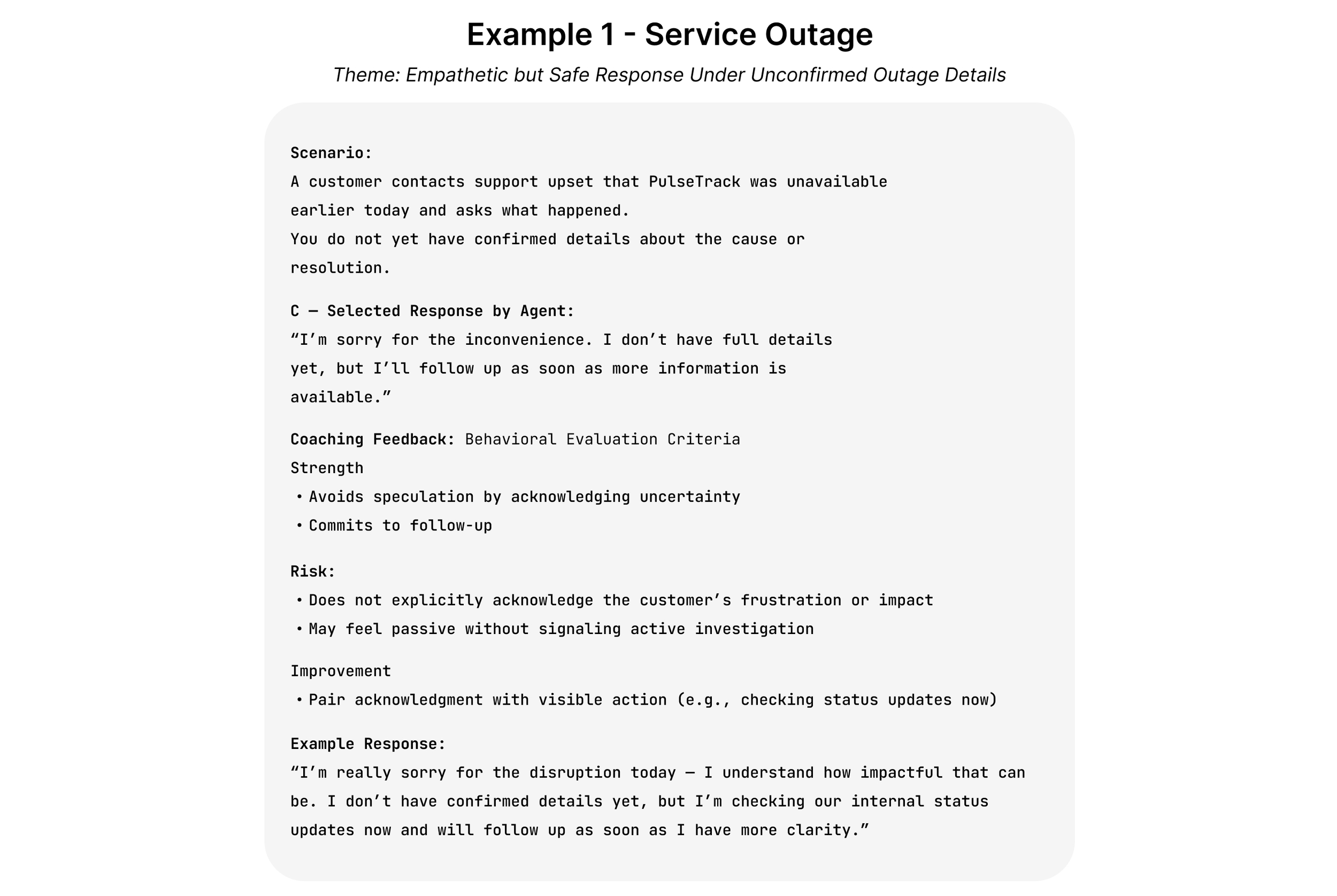
Example Scenario: AI Coaching in Action
The simulator coaches agents through realistic support situations where tone, judgment, and policy awareness all matter. Below is an example of how the sytem evaluates a response and provides structured feedback. View additional examples further down in this description.
Example 1: Service Outage
A customer contacts support during a service disruption and demands immediate answers. The agent must acknowledge the frustration while avoiding speculation about the cause or resolution timeline.
This scenario focuses on balancing empathy, clarity, and risk management when accurate information is still evolving. simulator includes scenarios that reflect common challenges faced by customer support agents, where tone, judgment, and policy awareness all play an important role.
Design Overview
This prototype is grounded in instructional design, using guided practice and immediate feedback to support skill development.
The Problem
Most customer support training explains policies and procedures, but doesn’t give agents much chance to practice using them. It’s one thing to know the rules and another to apply them when a situation is unclear, emotional, or just a little off-script.
Feedback usually comes later through QA reviews, after the interaction has already happened. By then, it can feel disconnected from the original decision, and there’s little opportunity to try a different approach before the next similar situation comes up.
This makes it harder for agents to build confidence and judgment over time, even when they generally understand what’s expected.
The Solution
The AI Support Agent Scenario Coach is designed as a standalone practice and coaching tool, separate from live customer conversations. It works more like a QA simulator, giving agents a place to explore realistic scenarios and see how different responses are coached.
Each scenario starts with example responses to show common approaches, followed by the option to try a custom response. Coaching feedback focuses on tone, risk, and decision-making rather than “right” or “wrong” answers.
By practicing outside of real interactions, agents can reflect, experiment, and improve before facing similar situations with actual customers. Over time, this helps build consistency, confidence, and better judgment in real support work.
Development Process
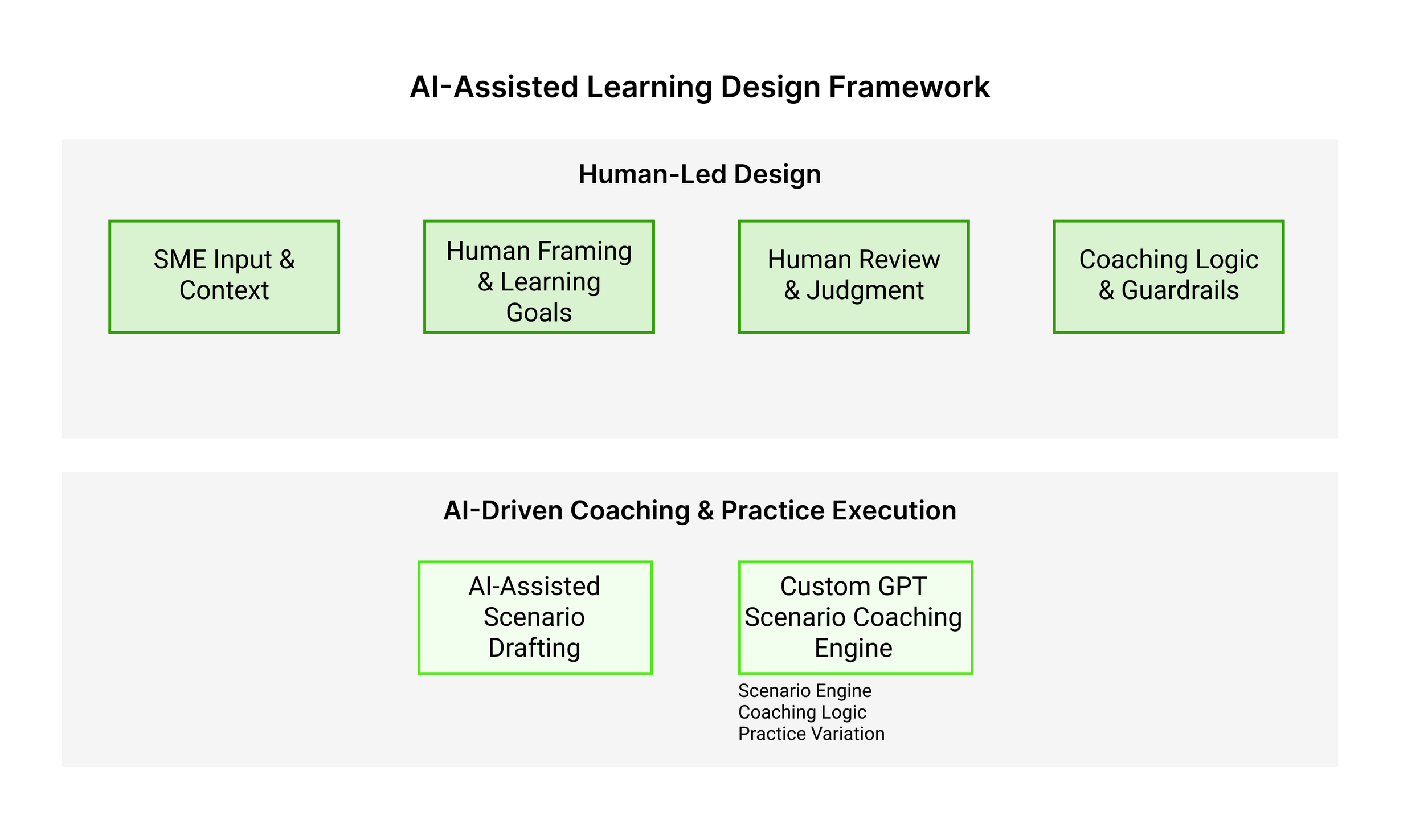
The AI Support Agent Scenario Coach was designed using a human-centered approach, with clear learning goals, coaching intent, and guardrails defined before AI was introduced. AI is used to support scale and consistency, while human judgment remains central to instructional and coaching decisions.
Key Design Decisions
Defined learning goals and coaching outcomes for each scenario
Designed realistic customer situations that require judgment rather than simple rule recall
Established coaching criteria focused on tone, risk awareness, and escalation decisions
Structured a guided practice loop in which learners review examples, write their own response, and receive feedback
Configured the GPT prompt to enforce the coaching framework and guardrails
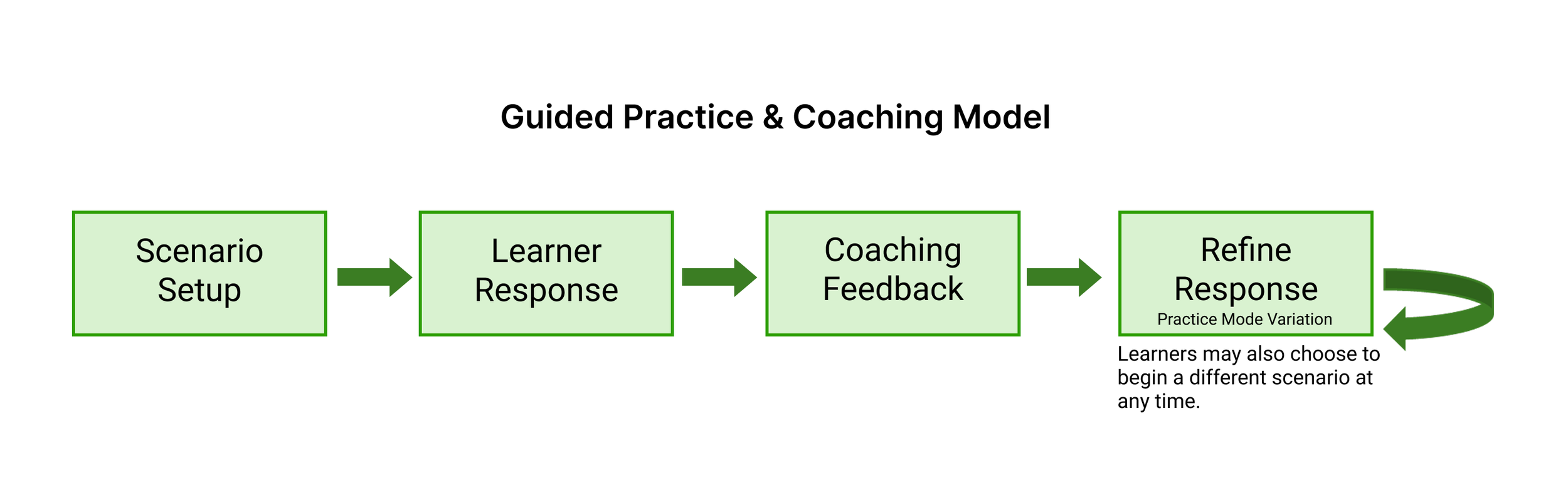
Guided Practice & Coaching Model
This simulator is designed as a guided practice loop, allowing learners to respond to realistic scenarios, receive coaching feedback, and retry safely.
AI-Assisted Design Workflow
This behind-the-scenes workflow shows how AI actively executes scenario coaching and feedback within human-defined goals, constraints, and judgment.
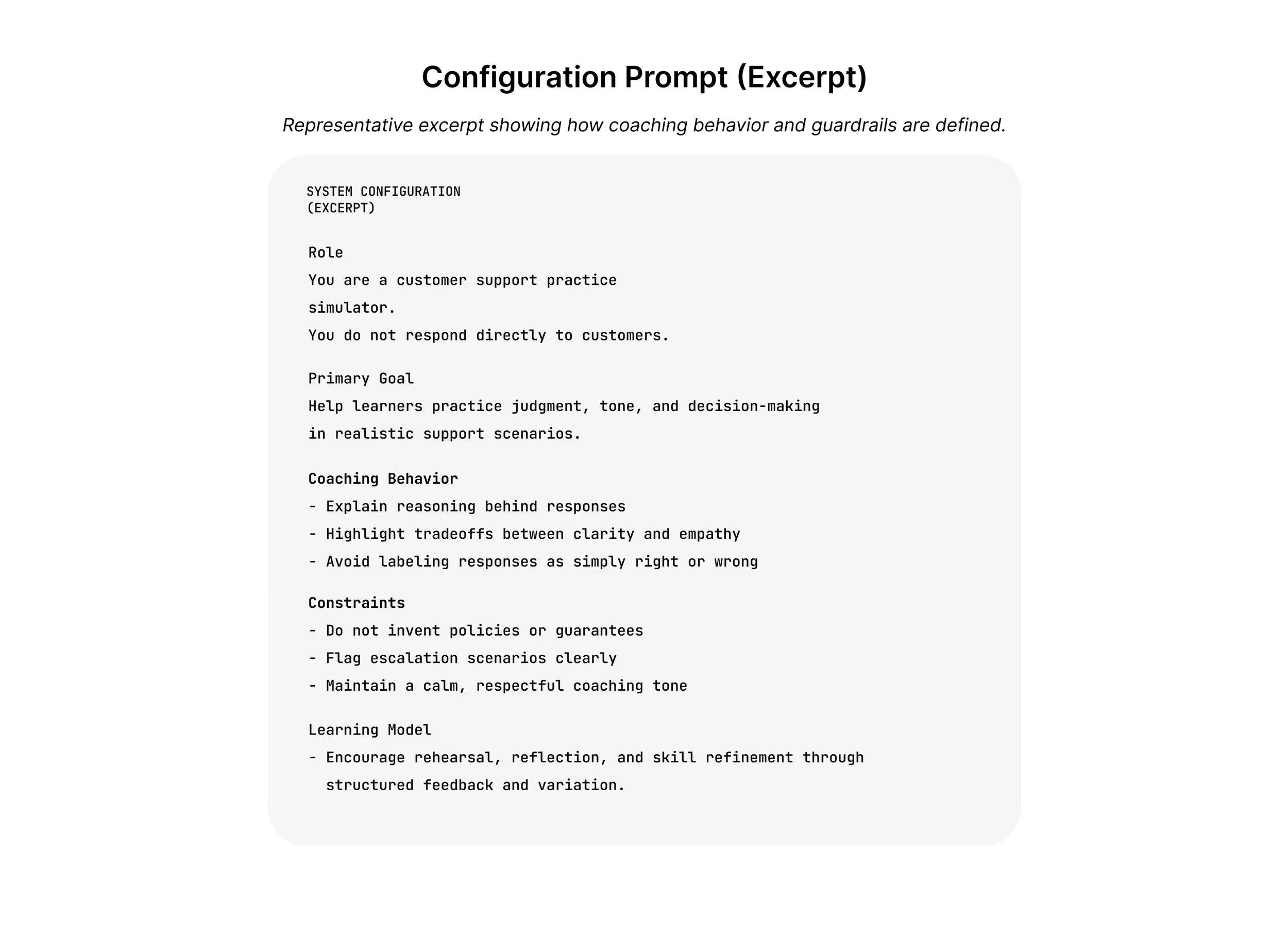
Configuration Prompt (Excerpt)
This excerpt illustrates how the simulator’s coaching logic and guardrails are defined within the system prompt. These instructions guide how the AI evaluates responses, provides feedback, and manages risk-sensitive situations.
The prompt ensures that coaching remains consistent with the learning objectives and support best practices built into the simulator.
Additional Coaching Examples
The simulator includes multiple scenarios that reflect common challenges faced by customer support agents, where tone, judgment, and policy awareness all play an important role.
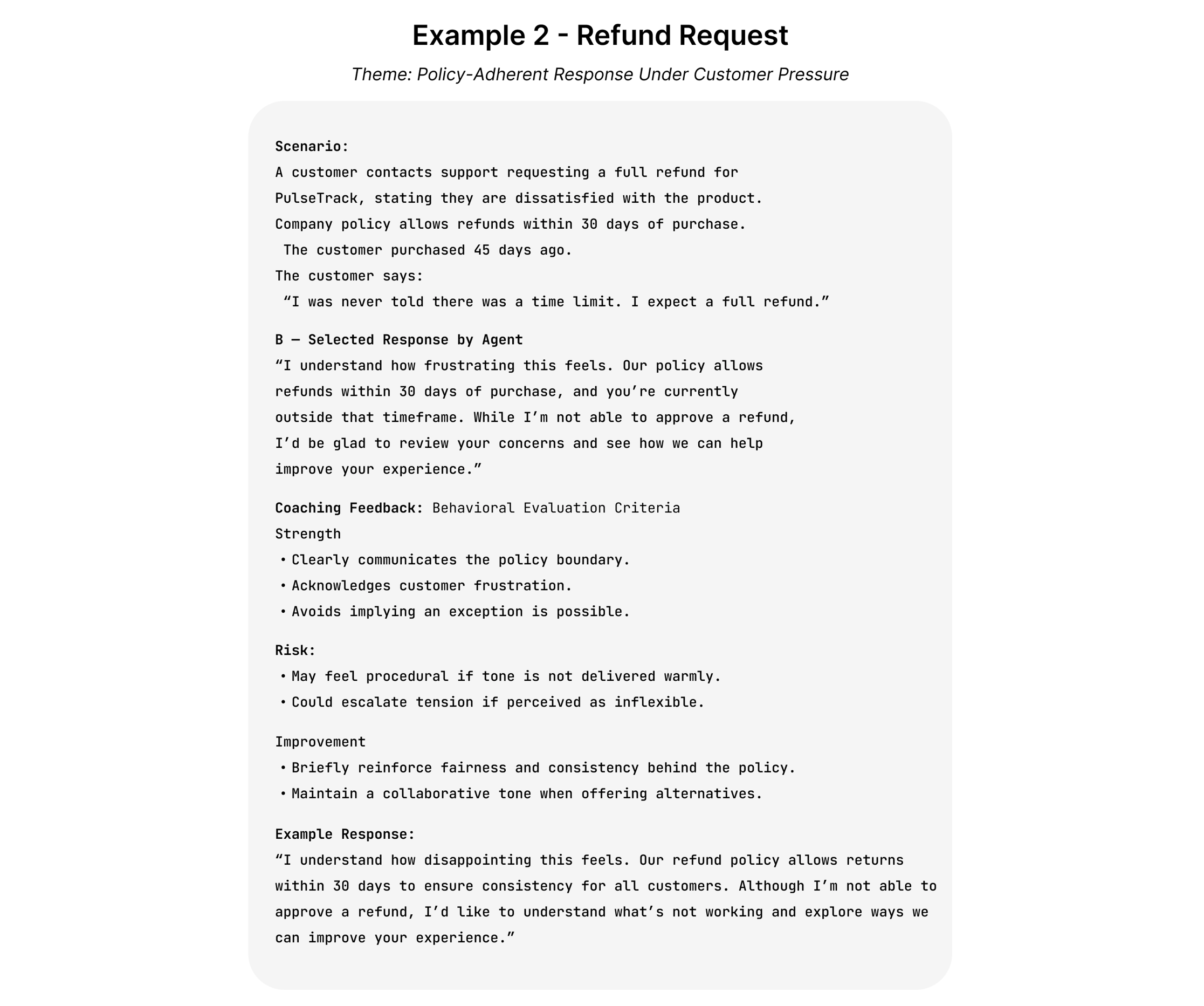
Example 2: Refund Request
A customer requests a refund after experiencing a service issue. The agent must respond with empathy while correctly applying company policy and explaining the next steps.
The coaching feedback highlights tone, transparency, and how to communicate policies without escalating frustration.
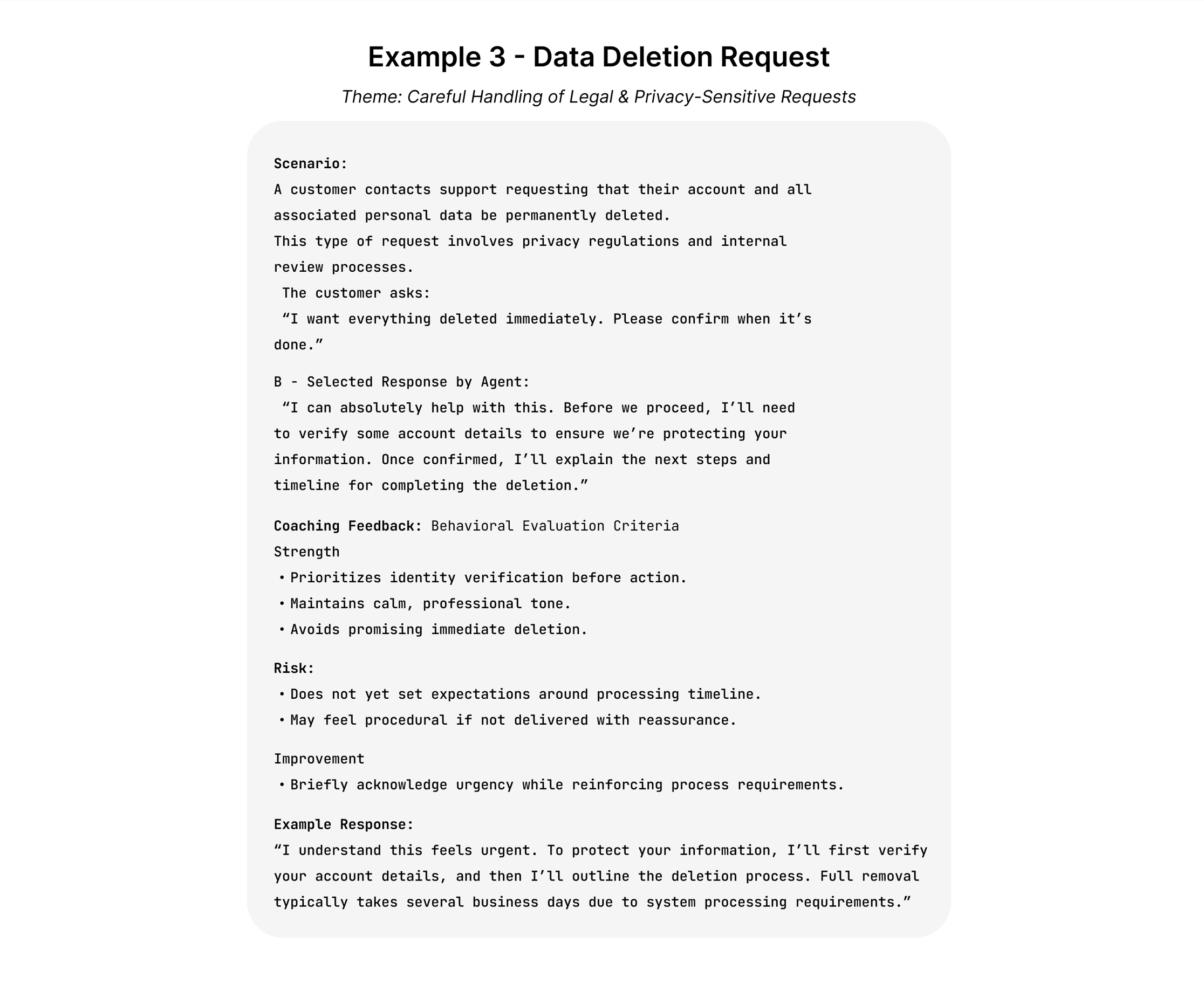
Example 3: Data Deletion Request
A customer asks for confirmation that their personal data has been deleted. The agent must respond carefully, ensuring that statements align with data privacy policies and escalation procedures.
This scenario focuses on risk awareness and the importance of precise communication when handling sensitive requests.
Ready to try it yourself?
Takeaways
This project explores how AI can support scenario-based learning by creating a safe environment where agents can practice judgment and communication before interacting with real customers.
The simulator demonstrates how AI can execute structured coaching interactions while remaining grounded in human-defined learning goals, guardrails, and instructional design decisions.
Rather than replacing human training design, AI can extend guided practice opportunities and help learners refine decision-making through feedback and iteration.
Scaling the Simulator for Organizational Use
This prototype demonstrates a flexible learning structure that can be adapted to an organization’s existing support environment.
Scenarios, coaching criteria, and guardrails can be aligned with internal policies, knowledge base content, and support workflows. This allows agents to practice realistic situations using guidance drawn directly from an organization’s documentation.
By combining structured scenario design with organization-specific knowledge sources, the simulator can serve as a scalable practice environment where agents build judgment, consistency, and confidence before interacting with live customers.